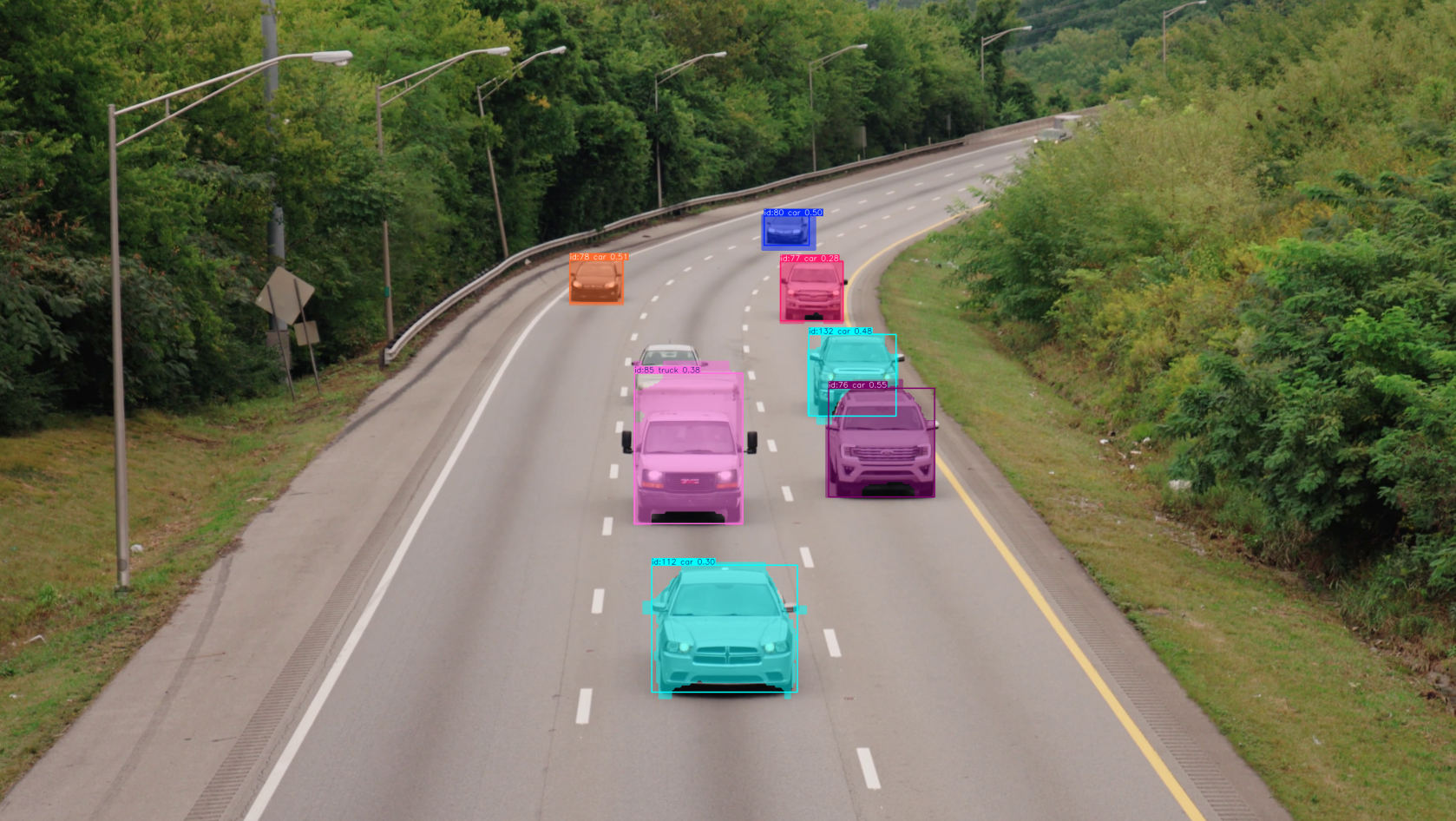
import sys
import cv2
from PyQt5.QtWidgets import QApplication, QMainWindow, QVBoxLayout, QHBoxLayout, QPushButton, QLabel, QFileDialog, QWidget, QMessageBox, QSizePolicy
from PyQt5.QtGui import QPixmap, QImage
from PyQt5.QtCore import Qt, QTimer
from ultralytics import solutions

class MainWindow(QMainWindow):
    def __init__(self):
        super().__init__()
        self.setWindowTitle("使用yolo算法对视频进行实时目标跟踪和分割")
        self.setGeometry(100, 100, 800, 600)
        self.setStyleSheet("background-color: white;")

        # 主布局
        self.main_widget = QWidget()
        self.setCentralWidget(self.main_widget)
        self.main_layout = QVBoxLayout()
        self.main_widget.setLayout(self.main_layout)

        # 按钮区域
        self.button_layout = QHBoxLayout()
        self.main_layout.addLayout(self.button_layout)

        self.select_image_btn = QPushButton("选择图片")
        self.select_image_btn.setStyleSheet("QPushButton { background-color: #f0f0f0; border: 1px solid #ccc; padding: 10px; font-size: 14px; }")
        self.button_layout.addWidget(self.select_image_btn)

        self.select_video_btn = QPushButton("选择视频")
        self.select_video_btn.setStyleSheet("QPushButton { background-color: #f0f0f0; border: 1px solid #ccc; padding: 10px; font-size: 14px; }")
        self.button_layout.addWidget(self.select_video_btn)

        self.process_btn = QPushButton("处理")
        self.process_btn.setStyleSheet("QPushButton { background-color: #4CAF50; color: white; border: none; padding: 10px; font-size: 14px; }")
        self.button_layout.addWidget(self.process_btn)

        self.save_btn = QPushButton("保存结果")
        self.save_btn.setStyleSheet("QPushButton { background-color: #2196F3; color: white; border: none; padding: 10px; font-size: 14px; }")
        self.button_layout.addWidget(self.save_btn)

        # 展示区域(自动适配)
        self.original_display = QLabel()
        self.original_display.setAlignment(Qt.AlignCenter)
        self.original_display.setStyleSheet("border: 1px solid #ccc; background-color: #f9f9f9;")
        # 设置大小策略,确保它会随窗口大小变化而变化,但不会无限增长
        size_policy = self.original_display.sizePolicy()
        size_policy.setHorizontalPolicy(QSizePolicy.Expanding)
        size_policy.setVerticalPolicy(QSizePolicy.Expanding)
        size_policy.setHeightForWidth(self.original_display.sizePolicy().hasHeightForWidth())
        self.original_display.setSizePolicy(size_policy)
        # 设置最小大小,防止变得太小
        self.original_display.setMinimumSize(400, 300)
        self.main_layout.addWidget(self.original_display)

        # 存储当前显示的内容
        self.current_pixmap = None

        # 连接信号
        self.select_image_btn.clicked.connect(self.select_image)
        self.select_video_btn.clicked.connect(self.select_video)
        self.process_btn.clicked.connect(self.process)
        self.save_btn.clicked.connect(self.save_result)

        # 创建定时器,控制帧率
        self.video_timer = QTimer(self)
        self.video_timer.timeout.connect(self.update_frame)

        self.isprocess = False
        self.isPrcVideo = True

        self.isegment = solutions.InstanceSegmentation(
            show=False,  # display the output
            model="yolo_model/yolo26n-seg.pt"
            # classes=[0, 2],  # segment specific classes i.e, person and car with pretrained model.
        )

        # 初始化存储处理后的帧数组
        self.processed_frames = []

    def update_display(self):
        """更新显示内容,保持图片/视频比例"""
        if self.current_pixmap:
            self.original_display.setPixmap(self.current_pixmap.scaled(
                self.original_display.width(), self.original_display.height(),
                Qt.KeepAspectRatio, Qt.SmoothTransformation
            ))

    def resizeEvent(self, event):
        """窗口大小变化时触发"""
        super().resizeEvent(event)
        # 调整展示区域大小
        self.update_display()


    def select_image(self):
        file_path, _ = QFileDialog.getOpenFileName(self, "选择图片", "", "Image Files (*.png *.jpg *.jpeg)")
        if file_path:
            pixmap = QPixmap(file_path)
            self.im_path = file_path
            self.current_pixmap = pixmap
            self.update_display()
            self.isPrcVideo = False

    def select_video(self):
        file_path, _ = QFileDialog.getOpenFileName(self, "选择视频", "", "Video Files (*.mp4 *.avi *.mov)")
        if file_path:
            # 清除原有显示内容
            if hasattr(self, 'video_capture'):
                self.video_capture.release()
            if hasattr(self, 'video_timer'):
                self.video_timer.stop()

            # 初始化 OpenCV 视频捕获
            self.video_capture = cv2.VideoCapture(file_path)

            # 检查视频是否成功打开
            if not self.video_capture.isOpened():
                QMessageBox.warning(self, "错误", "无法打开视频文件!")
                return
            self.isprocess = False
            self.isPrcVideo = True
            self.video_timer.start(30)  # 根据帧率设置定时器间隔


    def update_frame(self):
        # 读取下一帧
        ret, frame = self.video_capture.read()
        if ret:
            # 将 OpenCV 帧转换为 QImage
            if self.isprocess:
                results = self.isegment(frame)
                frame = results.plot_im
                # 存储处理后的帧
                self.processed_frames.append(frame.copy())
                frame = cv2.cvtColor(frame, cv2.COLOR_BGR2RGB)

            else:
                frame = cv2.cvtColor(frame, cv2.COLOR_BGR2RGB)
            h, w, ch = frame.shape
            bytes_per_line = ch * w
            q_image = QImage(frame.data, w, h, bytes_per_line, QImage.Format_RGB888)

            self.current_pixmap = QPixmap.fromImage(q_image)
            self.update_display()
        else:
            self.video_timer.stop()
            pass

    def process(self):
        if self.isPrcVideo:
            if hasattr(self, 'video_capture') and self.video_capture is not None:
                # 重置视频到第一帧
                self.video_capture.set(cv2.CAP_PROP_POS_FRAMES, 0)
                self.processed_frames = []
                self.isprocess = True
                if hasattr(self, 'video_timer'):
                    self.video_timer.stop()
                self.video_timer.start(30)
            else:
                QMessageBox.warning(self, "错误", "请先选择视频!")
        else:
            if self.im_path:
                im0 = cv2.imread(self.im_path)
                results = self.isegment(im0)
                self.img_result = results.plot_im
                img_result2 = cv2.cvtColor(self.img_result, cv2.COLOR_BGR2RGB)
                h, w, ch = img_result2.shape
                bytes_per_line = ch * w
                q_image = QImage(img_result2.data, w, h, bytes_per_line, QImage.Format_RGB888)
                self.current_pixmap = QPixmap.fromImage(q_image)
                self.update_display()
            else:
                QMessageBox.warning(self, "错误", "请先选择图片或视频!")


    def save_result(self):
        if self.isPrcVideo:
            if len(self.processed_frames) > 0:
                # 弹出保存视频对话框
                file_path, _ = QFileDialog.getSaveFileName(self, "保存视频", "", "Video Files (*.mp4 *.avi *.mov)")
                if file_path:
                    # 获取第一帧的尺寸
                    height, width, _ = self.processed_frames[0].shape
                    # 初始化视频写入器
                    fourcc = cv2.VideoWriter_fourcc(*'mp4v')
                    video_writer = cv2.VideoWriter(file_path, fourcc, 30.0, (width, height))

                    # 写入所有帧
                    for frame in self.processed_frames:
                        video_writer.write(frame)

                    # 释放资源
                    video_writer.release()
                    QMessageBox.information(self, "成功", "视频保存成功!")
            else:
                QMessageBox.warning(self, "错误", "请先处理视频!")
        else:
            if self.im_path:
                file_path, _ = QFileDialog.getSaveFileName(self, "保存图片", "", "Image Files (*.png *.jpg *.jpeg)")
                if file_path:
                    cv2.imwrite(file_path, self.img_result)
                    QMessageBox.information(self, "成功", "图片保存成功!")
            else:
                QMessageBox.warning(self, "错误", "请先选择图片或视频!")

if __name__ == "__main__":
    app = QApplication(sys.argv)
    window = MainWindow()
    window.show()
    sys.exit(app.exec_())